
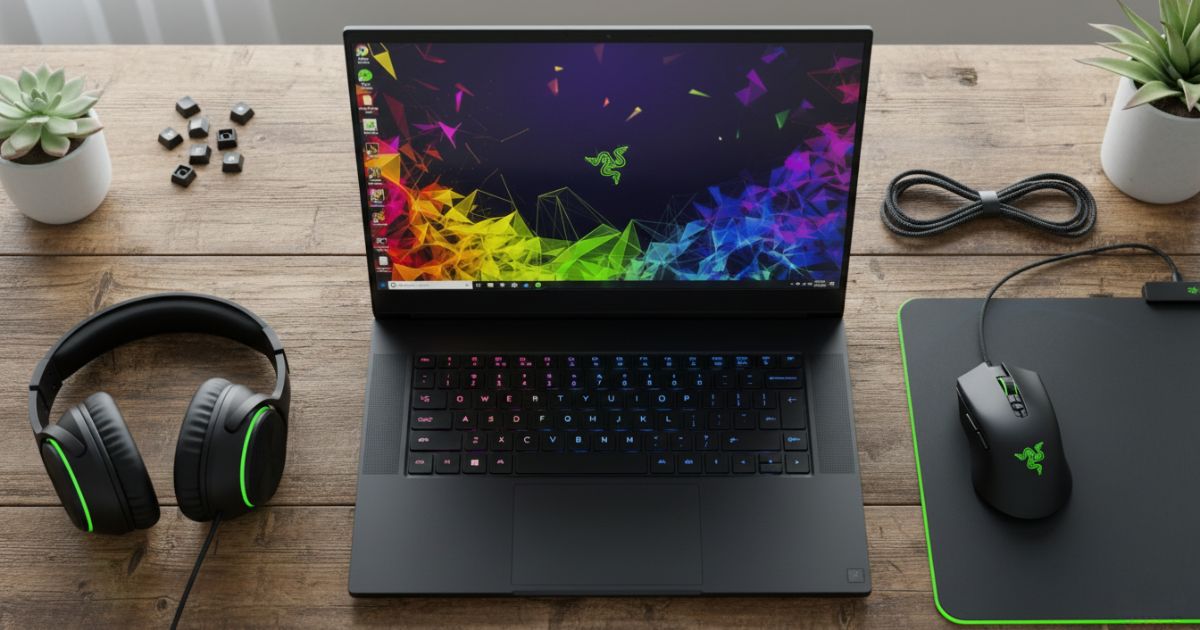
The Razer Blade 15 2018 H2 remains a remarkable gaming laptop even in 2025, blending performance, portability, and design seamlessly. Its aluminum body and thin chassis make it lightweight yet durable, while the Intel Core i7-8750H processor and NVIDIA GeForce GTX 1060 or 1070 Max-Q graphics deliver smooth gaming and content creation experiences. Gamers, creators, and professionals still appreciate its sleek design, high FPS, and multitasking capabilities.
Equipped with 16GB DDR4 RAM and 512GB SSD, this laptop handles video editing, Photoshop, and Premiere effortlessly. The Full HD 1920×1080 144Hz display provides vibrant visuals, smooth gameplay, and accurate color reproduction, perfect for AAA titles or creative workloads. Its thin-and-light form factor ensures portability, letting students and professionals work on-the-go without compromising performance.
With Razer Synapse and Chroma RGB keyboard, you get customizable lighting and precise control. The USB Type-A, Thunderbolt, HDMI, and Mini DisplayPort ports cover all connectivity needs, while the dual fans and vapor chamber cooling maintain safe temperatures under heavy load, keeping thermal throttling at bay. Overall, the Razer Blade 15 2018 H2 balances power, versatility, and reliability for a cost-effective investment.
Design and Build Quality Razer Blade 15 2018 H2
The CNC aluminum chassis gives the Razer Blade 15 2018 H2 a premium look and durable build. Its sleek, portable, and lightweight design fits perfectly in a backpack for travel or professional use, while the anodized matte finish resists scratches and fingerprints. Every corner reflects precision engineering, making it a stylish and robust device.
Despite being thin, the laptop withstands rigorous use, and the unibody construction enhances rigidity. The aluminum block design adds weight balance, while the 0.66–0.78 inches thickness ensures easy mobility without sacrificing strength. For gamers and content creators, the Razer Blade 15 2018 H2 provides portability without losing the premium feel.
Display and Visual Experience
The 15.6-inch Full HD 1920×1080 144Hz display offers crisp, vibrant visuals for gaming, video editing, and creative work. Its IPS panel delivers wide viewing angles, consistent color reproduction, and smooth refresh rates, ideal for AAA titles like Cyberpunk 2077 or Forza Horizon 4. QHD 240Hz or OLED panels may be present in modern alternatives, but the Blade 15 2018 H2 remains immersive and responsive.
Stutter-free gameplay, accurate colors, and high FPS make every frame enjoyable, whether gaming, streaming, or multitasking. Its vivid display complements content creation, letting designers and editors focus on details while maintaining smooth visuals. The display remains one of the laptop’s strongest points, making it relevant even years later.
Performance and Gaming Capabilities
Powered by Intel Core i7-8750H or i7-9750H, the Razer Blade 15 2018 H2 handles multitasking, AAA gaming, and creative applications effortlessly. The NVIDIA GeForce GTX 1060, 1070, or RTX 2060/2070 Max-Q graphics deliver ray tracing, DLSS, and high FPS in modern games. Whether playing Valorant, CS2, Dota 2, or Hitman 2, you enjoy optimized performance and smooth frame rates.
Its DDR4 RAM, PCIe NVMe SSD, and fast storage ensure quick boot, file loading, and productivity workflows. For content creators, Photoshop, Premiere, and DaVinci Resolve run without hiccups. Even gaming on ultra settings sees minimal thermal throttling, thanks to dual fans, vapor chamber cooling, and Dynamic Boost technology. The Blade 15 2018 H2 is a balanced powerhouse for gamers and creators alike.
Storage and Memory
With 16GB DDR4 RAM and 512GB NVMe SSD, the Razer Blade 15 2018 H2 supports heavy multitasking and large project files. You can upgrade to 32GB RAM or 1TB/2TB SSD for creative workflows, gaming libraries, or content storage. Its SO-DIMM slots and PCIe Gen4 support make installation and upgrades seamless. Whether editing videos, designing graphics, or running multiple applications, performance remains smooth.
Battery Life and Portability
The 80Wh battery provides around 5–6 hours for light use, web browsing, or content editing, while gaming or video rendering lowers runtime. Airplane mode, BIOS optimizations, and NVIDIA Optimus extend battery efficiency, and the thin-and-light form factor ensures easy travel. Despite average battery life, its mobility and portability keep it relevant for students, professionals, and creators on-the-go.
Keyboard and Touchpad
The Chroma RGB keyboard provides per-key customization, anti-ghosting, and tactile feedback for gaming and productivity. Its Microsoft Precision XL touchpad ensures accurate gestures and smooth input, making editing and control precise. With Razer Synapse 3 and 4, you can adjust lighting, fan curves, and performance modes, creating a personalized user experience.
Connectivity and Ports
The Blade 15 2018 H2 features USB Type-A, Type-C, Thunderbolt 3 & 4, HDMI, Mini DisplayPort, and SD card slots, supporting external monitors, eGPUs, and peripherals. Its Wi-Fi 6E and Bluetooth 5.0 provide fast wireless connections for gaming, streaming, and professional tasks. The variety of ports makes it versatile, whether for productivity, content creation, or gaming setups.
Cooling System and Thermal Performance
The dual fans and vapor chamber cooling maintain safe temperatures between 40–85°C under load, reducing thermal throttling. Regular repaste improves heat dissipation, while stress tests ensure long-term efficiency. The cooling system lets you game, edit, and multitask without worrying about overheating.
Audio Quality
The stereo speakers with Dolby Atmos and THX 7.1 surround sound deliver clear, immersive audio. Gaming, content creation, and streaming benefit from positional accuracy, making headphones optional for many tasks. The laptop provides consistent sound quality, complementing its visual and performance capabilities.
Software and User Experience
Razer Synapse 3 and 4 enable keyboard lighting customization, fan control, and performance mode adjustments, making the user experience intuitive. Its easy-to-use interface helps gamers, creators, and professionals manage profiles, optimize workflows, and maintain device efficiency. The software suite ensures control, flexibility, and productivity at all times.
Longevity and Relevance in 2025
Even in 2025, the Razer Blade 15 2018 H2 remains relevant for light-to-moderate gaming, creative work, and professional tasks. Its durable design, upgradable storage, and performance reliability make it a cost-effective, portable, and versatile device. For students, gamers, and content creators, it continues to deliver value, endurance, and practical usability.
Pros and Cons
The Blade 15 2018 H2 offers sleek aluminum build, high-performance GPU, vibrant 144Hz display, and customizable RGB keyboard, making it a premium choice. On the downside, battery life is average, and heavy gaming may heat the GPU, limiting ultra settings. Still, its balance of portability, power, and design keeps it competitive.
Ideal Use Cases
Ideal for gamers, students, and content creators, the Razer Blade 15 2018 H2 excels in multitasking, editing, and professional workflows. Its portable design and mid-range performance make it suitable for casual gaming, creative projects, and productivity tasks. The laptop supports 1080p gaming, video editing, and daily professional use efficiently.
Razer Blade 15 2018 vs. Modern Alternatives
Compared to Dell G5, Alienware 15 R4, and MSI GS65 Stealth, the Razer Blade 15 2018 H2 holds its ground with solid thermals, 144Hz Full HD display, and aluminum build. While modern RTX GPUs offer ray tracing and enhanced performance, the Blade 15 H2 remains lightweight, portable, and versatile for gaming and creative work, offering value in the mid-tier market.
| Category | Razer Blade 15 2018 H2 | Modern Alternatives |
| Processor | Intel Core i7-8750H – C (classic CPU, still capable) | Intel Core i9 / i7 12th–13th Gen – C (latest CPU, higher speed) |
| Graphics | GTX 1060 Max-Q / 1070 Max-Q – G (good for 1080p) | RTX 3060–4070 / 4080 Laptop GPU – G (high FPS, ray tracing) |
| RAM | 16GB DDR4 – R (adequate for multitasking) | 16GB–32GB DDR5 – R (future-proof multitasking) |
| Storage | 256GB / 512GB NVMe SSD – S (fast boot & apps) | 1TB–2TB NVMe SSD + M.2 slot – S (mass storage, speed) |
| Display | 15.6″ FHD, 144Hz, IPS – D (smooth visuals) | QHD / 4K, 240Hz, G-SYNC – D (ultra-smooth, immersive) |
| Battery | Up to 6 hours – B (average, decent for portability) | 6–8 hours, Optimus Mode – B (longer runtime, efficient) |
| Build Quality | CNC Aluminum Chassis – Q (sleek & durable) | Aluminum / Magnesium Alloy – Q (light, premium feel) |
| Portability | 4.6 lbs, 0.66–0.78 in – P (thin & light) | 4–5 lbs, 0.67–0.75 in – P (ultra-portable modern laptops) |
| Cooling | Dual fans + vapor chamber – T (good thermal control) | Enhanced vapor chamber + AI fan control – T (efficient cooling) |
| Keyboard | RGB Chroma, Anti-Ghosting – K (customizable gaming) | Per-key RGB, Mechanical-like – K (advanced gaming) |
| Connectivity | USB 3.1, Thunderbolt 3, HDMI, Mini DP – C (versatile ports) | USB 3.2, Thunderbolt 4, HDMI 2.1 – C (modern connectivity) |
| Audio | Dolby Atmos stereo speakers – A (immersive sound) | THX Spatial Audio, 7.1 surround – A (lifelike audio) |
| Software | Razer Synapse – S (lighting & performance control) | Razer Synapse 4 + AI optimization – S (enhanced control) |
| Weight | 4.6 lbs – W (portable, backpack-friendly) | 4.4–4.8 lbs – W (ultra-light modern design) |
| Upgradeable | RAM up to 32GB, M.2 SSD – U (limited but effective) | RAM up to 64GB, dual M.2 slots – U (future-proof upgrades) |
| Performance | 1080p gaming, moderate multitasking – F (solid for 2025) | 1440p–4K gaming, heavy multitasking – F (high-end performance) |
| Thermal Performance | Idle 40–45°C, Load 75–85°C – T (balanced heat) | Optimized AI + repasted thermal paste – T (cooler & quieter) |
| Longevity | Still viable for mid-range use – L (good lifespan) | High performance for 5+ years – L (future-ready) |
| Price | Lower cost, second-hand friendly – $ (budget-friendly) | Premium cost, latest tech – $ (investment for future) |
| Use Cases | Casual gaming, students, content creators – U (versatile) | Professional gaming, editing, AI tasks – U (high-demand usage) |
Conclusion
The Razer Blade 15 2018 H2 continues to be a reliable, powerful, and versatile gaming laptop in 2025. Its aluminum build, high FPS performance, 144Hz display, and upgradable storage make it suitable for gamers, professionals, and content creators. With portability, endurance, and cost-effective value, it stands out as a long-lasting investment in the 15-inch laptop category.
FAQs
What makes the Razer Blade 15 2018 H2 stand out?
The Razer Blade 15 2018 H2 stands out with its sleek aluminum build, thin chassis, and lightweight design. It combines Intel Core i7 processor, NVIDIA GTX 1060/1070 Max-Q GPU, and 16GB DDR4 RAM for smooth gaming, multitasking, and creative workflows. Its Full HD 144Hz display ensures vibrant visuals, while Razer Synapse and Chroma RGB keyboard provide customizable lighting and user control.
Can the Razer Blade 15 2018 H2 handle modern games?
Yes, the Razer Blade 15 2018 H2 handles AAA titles, high FPS gaming, and video rendering efficiently. The dual-fan cooling system and vapor chamber thermal design prevent overheating, while NVIDIA graphics and DDR4 RAM ensure smooth performance. Games like Valorant, CS2, and Dota 2 run seamlessly at high settings.
How is the display quality on this laptop?
The 15.6-inch Full HD 1920×1080 144Hz display offers crisp visuals, accurate color reproduction, and wide viewing angles. Its IPS panel supports smooth refresh rates, making it perfect for gaming, video editing, and creative projects. The vibrant display enhances AAA games, streaming, and multimedia content.
What is the battery life like?
The 80Wh battery provides 5–6 hours of light productivity, web browsing, and video editing. Gaming or heavy workloads reduce runtime, but NVIDIA Optimus and power-saving modes improve battery efficiency. While not the longest-lasting, it remains portable for students and professionals on-the-go.
Is the Razer Blade 15 2018 H2 good for content creation?
Absolutely. Its Intel i7 processor, GTX 1060/1070 Max-Q GPU, 16GB RAM, and 512GB NVMe SSD handle video editing, Photoshop, Premiere, and 3D rendering effortlessly. The vivid 144Hz display, high FPS, and accurate colors ensure smooth workflows for creative professionals.
What ports and connectivity does it have?
The Blade 15 2018 H2 includes USB Type-A, USB Type-C, Thunderbolt 3, HDMI, Mini DisplayPort, and SD card slots. Wi-Fi 6E and Bluetooth 5.0 support fast wireless connections for gaming, streaming, and professional tasks. The variety of ports ensures versatility for peripherals and external monitors.
Can it be upgraded?
Yes, the Razer Blade 15 2018 H2 supports RAM upgrades up to 32GB and SSD expansion up to 1–2TB. Its SO-DIMM slots and PCIe NVMe SSD support allow easy enhancements for gaming, multitasking, and content creation. Upgrades extend device longevity and performance relevance.
How is the keyboard and touchpad experience?
The Chroma RGB keyboard offers per-key customization, anti-ghosting, and tactile feedback. The Microsoft Precision XL touchpad ensures accurate gestures, smooth input, and precision control. Razer Synapse allows lighting and performance customization, giving a personalized experience for gamers and creators.
Does it overheat during gaming?
No, the dual-fan system and vapor chamber cooling maintain safe temperatures under heavy load, preventing thermal throttling. Regular maintenance like repasting can improve heat dissipation, ensuring long-term reliability during gaming, editing, or multitasking.
Is the Razer Blade 15 2018 H2 still relevant in 2025?
Yes, its aluminum build, portable form factor, 16GB RAM, 144Hz Full HD display, and NVIDIA GTX graphics make it suitable for gaming, content creation, and professional tasks. Its upgradeable storage, reliable performance, and versatility ensure it remains a cost-effective choice even years later.